Home > Products > PPT2DVD Pro > What's New
|
Wondershare PPT2DVD Pro V6.1.7 released. (11/26/2010) 1. Reorganized and updated the video format list. 2. Replaced the help document with online help. 3. Added the online customer service link. 4. Updated the brand VI.
Wondershare PPT2DVD Pro V6.1.5 released. (5/20/2010)
1. Compatible with Office 2010.
Wondershare PPT2DVD Pro V6.1.0 released. (2/1/2010)
1. Up to 130 output video formats, 7 HD video formats supported. 3. Added the feature to customize the background pictures of the buttons in menu settings.
Wondershare PPT2DVD V6.0.3 released. 1. Fixed the bug that cannot select DVD recorder partition when burning Wondershare PPT2DVD V6.0 released. (10/19/2009)
Wondershare PPT2DVD V5.5 released. (05/04/2009)
Wondershare PPT2DVD V5.3 released. (03/12/2009)
Wondershare PPT2DVD V5.2 released. (01/20/2009) For providing the best service to our customers, our developers made great achievements on improving Wondershare's flagship product PPT2DVD. Many thanks to the customers who give us inspirations leading to the improvement of PPT2DVD.
The main improvements in Wondershare PPT2DVD v5.2 are as below:
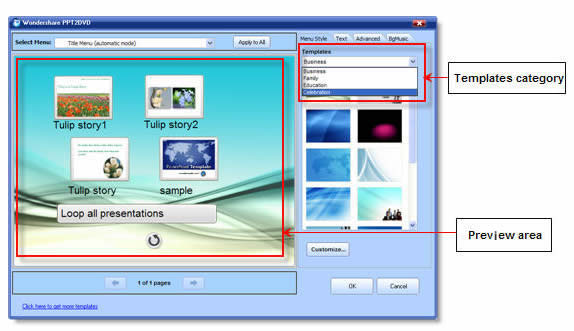
The new DVD menu designer improves your working efficiency a lot. Click on an object on the designing pane, the settings pane presents corresponding settings immediately on the right.
4. Optimized the using experience
5. Improved compatibility of the DVD burner by updating its SDK
6. One audio codec was added to improve audio compatibility
7. Fixed minor bugs under manual mode Wondershare PPT2DVD V5.1.5 released. (11/26/2008) 2. Enhanced animations playing functions; Wondershare PPT2DVD V5.1.1 released. (10/22/2008)
1. Improved the using experience; 2. Fixed some minor bugs. Wondershare PPT2DVD V5.1.0 released. (09/27/2008)
1. Improved the using experience of installing PPT2DVD; 2. Improved the conversion stability; 3. Fixed the problem that may cause burning failure; 4. Fixed problems caused in 120 DPI display mode. Wondershare PPT2DVD V5.0.0 released. (08/26/2008)
Our developers have successfully developed a new processing engine to eliminate flickers from output. Images are perfectly stable, say good bye to flickers!
The new processing engine does not only guarantees output quality, but also gears up the conversion speed up to 60%. After testing more than 1000 PowerPoint presentations, we found that the conversion time is 25% shorter than the last version in average.
After all, the new processing engine improved the compatibility of output. More media players and DVD machines accept the output produced by PPT2DVD 5.0. Due to our test, the DVD movies produced by 5.0 are supported by 16 popular media players.
PPT2DVD 5.0 provides 36 menu templates for creating eye-catching DVD menu in an easier way. A menu template includes a background and a collection of buttons, frames and icons with the same style. Only one click you can create beautiful DVD menu.
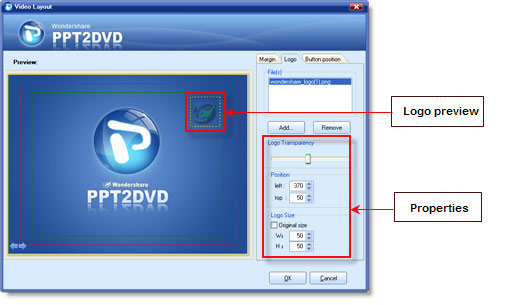
With PPT2DVD 5.0, you are allowed to add up to 6 logos to all the slide shows in the same project. This is a creative and practical feature for copyright demonstration especially for the business use.
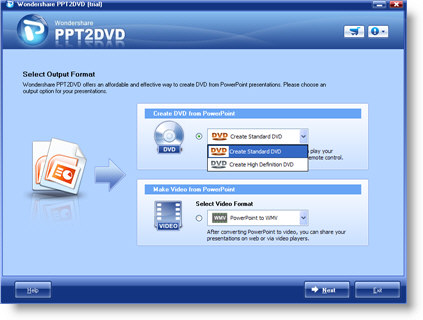
PPT2DVD 5.0 brings you a new look. The crystal sleek blue is fashion and attractive. Also, the user interface is more easy-to-use than the previous version.
|
||
|
Recommended Product

Only $39.95 $49.95 Buy Now
Quick Links
Products List